
What Is Google Performance Max Ads
Performance marketers can access all of their Google Ads inventory through a single campaign thanks to the new goal-based campaign type known as Performance Max. In all of Google’s channels, including YouTube, Display, Search, Discover, Gmail, and Maps, it’s intended to compliment your keyword-based Search ads and assist you in locating more customers who convert. By using Smart Bidding to optimize performance in real-time and across channels, Performance Max enables you to drive performance based on your defined conversion goals, resulting in more conversions and value. Google’s automated tools for bidding, budget optimization, audiences, creatives, attribution, and other areas are all combined in Performance Max. Your unique advertising goal (for instance, if you have a CPA or ROAS aim) plus the creative materials, audience signals, and optional data streams you offer are what give them all their strength.
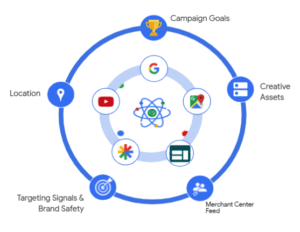
Performance Max’s Main Advantages For Campaign Planning.
- Total focus on goals: The strategy’s core objective is to achieve your marketing objectives. The core of your marketing strategy revolves around your goals. Depending on your goals, artificial intelligence can help you locate the right kind of customer so you can reach them across the Google ecosystem with the ideal advertisement.
- Accelerate outcomes: By using Google Signals inputs, you can start your campaigns more quickly and get results more quickly.
- Reporting: To see which ads are working better, you will receive fresh reports on your Google Insights website.
Effective Strategies For Google Ads Performance Max.
Beware of URL expansion
We are aware that Performance Max campaigns combine several Google Ads formats into one: Search, Display, Discovery, Video, Shopping, Local, and pretty much everything else (for the time being, at least). Therefore, it makes sense that some Performance Max features “steal” from quirks found in other campaigns.
The PMax edition of Dynamic Search Ads has a peculiarity called URL expansion that is simple to overlook. Performance Max campaigns have URL expansion enabled by default. This means that, similar to a dynamic ad group, unless you turn it off, the campaign has permission to redirect people to landing sites other than your final URL.
Avoid finicky location settings.
You can decide whether you want to target based on “Presence or interest” (people in the location or interested in it) or “Presence” only when it comes to location-based advertising. I only suggest “Presence” because if you don’t, folks who aren’t in the designated areas might see your adverts.
Google opts for the former, nevertheless. Thus, make sure to alter that.
The Google Analytics segment I described earlier will be helpful if you have been running your ad by accident using Presence or interest because it will show you which places are generating visitors.
For enhancements to reporting transparency, go under the Insights tab.
While there is some truth to the complaints regarding Performance Max’s lack of reporting transparency, there is also a lot of useful information on the Insights tab.
You will begin to see the top performing “Search categories” and “Audience segments” after your campaign has been running for a few days or weeks (depending on your budget).
Steps For Establishing a Performance Max Campaign
You may easily advertise your goods or services on the Google network by using Maximum Performance campaigns, as you have shown. The procedures you must adhere to in order to create this type of Google Ads campaign are listed below.
1. Start a new campaign and select your objective.
Log into your Google Ads account, click the “+” button next to “Campaigns” in the menu on the left side of the screen, and then choose “New campaign.”
Decide who you want your campaign to reach. You can choose the option to “Create a campaign without targeting” if none of them fit what you’re looking for.
Last but not least, choose Maximum Performance as the campaign type.
2. Decide on a spending plan and a bid
Enter your desired daily spending average in the “Budget and bids” column, then select your preferred bidding strategy:
Conversions: If you tick the box next to “Set a target cost per action,” the campaign will make an effort to meet your target CPA.
Conversion rate: If the “Set a goal ROI” checkbox is selected, the campaign will make an effort to meet the target ROAS you provide.
Keep in mind that the campaign’s monthly payment cap is determined by the budget. Google advises selecting an average daily budget for campaigns with Maximum Performance that is at least three times your CPA or cost per conversion for the conversion activities you have chosen for your campaign.
3. Include your location and language selections in the campaign settings.
Make your choice for your target place under “Locations” on the “Campaign settings” page. Your adverts will be targeted where you desire, and you can include or exclude areas that don’t interest you.
Choose the language in which you want to deliver your advertising under “Languages.” To target different customer groups with your adverts, you can choose from a variety of languages.
By selecting additional variables, such as ad timing, end URL expansion, or campaign URL choices, you can further customize your advertising.
4. Create your resource group.
The photos, logos, titles, descriptions, videos, and audience indicators you include when creating your Peak Performance campaign are used to create the resource group. Each asset group needs to be named specifically and have the following components:
- Resource
- Images
- Logos
- Videos
- Titles
- Long titles
- Descriptions
- Call to action
- Ad URL options
5. Add ad extensions.
Ad extensions are encouraged by Google since they give users access to additional valuable business information. Based on the objectives you’ve set, the platform recommends ad extensions to you.
6. Make your campaign public
You will be taken to an overview so you can review every element before you finish setting up your campaign. To complete the process, choose “Publish campaign” when everything is prepared.